More Than a Box: Rethinking Medical Device Packaging
Medical device packaging is often treated as an afterthought: a protective shell, a shipping necessity or a marketing vehicle. But in medical device development, packaging is far more than a container. It’s the first point of contact between a user and the product, setting expectations for how that device will be handled, opened and used. From the moment someone picks it up, packaging begins shaping their mental model of what comes next. When designed thoughtfully, it becomes a tool for safety and compliance, communicating key information and guiding correct behaviors before the device is handled or the instructions are read.
The First User Experience Starts with the Box
When you think about a medical device’s “user interface,” you probably picture buttons, screens or maybe a sleek ergonomic design. But the user experience actually begins long before anyone touches the device. It starts with the packaging.
From the moment a nurse, pharmacist, patient or caregiver picks up a box, they’re already interpreting its signals. How it opens, where information is located, what colors are used, how heavy or fragile it feels—all of these details shape expectations, or assumptions, about what’s inside and how it should be handled. Packaging teaches users what to do next, even if they don’t realize it.
Those first impressions matter. If a critical warning is hidden under a pharmacy label or printed in low-contrast text, it might never be seen. If the package doesn’t clearly show how to open it, a user might apply too much force or grip the wrong part, risking damage to the device or even injury. (For example, gripping the needle end of an autoinjector, resulting in an accidental injection into a thumb.) On the other hand, clear visual and tactile cues, intuitive layout and design, and prominent safety information can prevent those issues entirely, reinforcing correct use even before instructions are read.
Too often, though, packaging is treated as an afterthought—a protective shell or a branding exercise—rather than as part of the product’s human factors design. In reality, medical device packaging is the first and most consistent part of the user experience. When designed intentionally, it can communicate, guide and reinforce correct use as part of the total user interface for the device.
Putting Medical Device Packaging to Work
When packaging is treated as part of the user interface, it takes on real responsibility. It doesn’t just contain a device. Every design choice, from how the package opens to what the user sees first, can influence safety and performance.
Thoughtful packaging design can:
- Communicate safety-critical information: Details like drug identification, strength, storage requirements, expiration dates and whether a product is single- or multi-use must be clear before the package is opened. If this information is buried in fine print or obscured by a pharmacy label, users may store products incorrectly, use expired devices or reuse something meant for disposal.
- Guide the unboxing process: Users should immediately know where and how to open the package, without tearing, shaking or forcing it. Poorly placed flaps or unclear opening cues can lead to confusion, product damage or even injury. Structural design, tactile indicators and simple cues like color contrast or “lift here” tabs can make the process intuitive and safe.
- Provide clues for safe handling: The shape, texture, visual design and internal structure of the package should naturally guide how the device is lifted out and held. When packaging fails to do this, users may grip the wrong part, contaminate sterile surfaces or drop the product.
- Inform intended use: Packaging can also help disrupt false assumptions. For example, users often assume a new autoinjector will work like other injectors they’ve seen, unless the packaging design indicates otherwise. Clear graphics, labeling and physical cues can help reset those expectations before the device is handled.
When these elements come together, packaging becomes more than protection; it becomes part of the human factors system that supports safe, correct use from the very first touch.
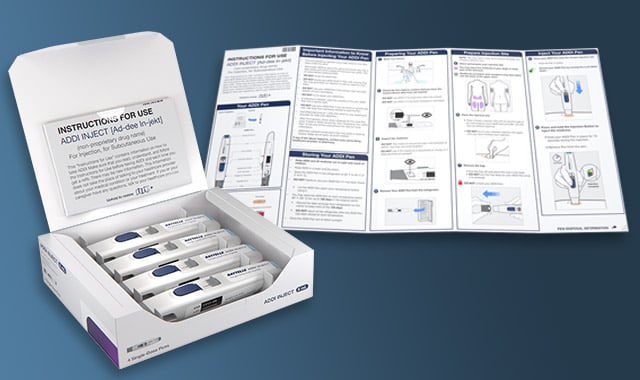
For example, Battelle’s team developed a packaging concept for an autoinjector to explore how packaging could actively enhance safety and usability. The “ideal packaging” design incorporates both structural and visual features that guide correct behavior. Physical cutouts and contours guide users to grasp the device in the right place, preventing breakage and accidental activation. An accordion-style quick reference guide is built into the lid, reinforcing proper use and encouraging consultation of the full instructions for use. High-contrast labeling makes storage and expiration information visible at a glance, without being obscured when stacked or labeled in pharmacy settings. In a particularly innovative touch, the design turns the device itself into its own diagram, using in-box labeling to highlight key parts and functions.
The result was a package that does more than protect its contents; it’s part of the device’s communication system. Every visual, structural and tactile cue works together to guide users safely and intuitively, reducing the need for extra training or interpretation.
Designing for the Total User Interface
True usability isn’t just about how a medical device looks or functions. It’s about how every element of the product system works together to support safe, correct use. The device, Instructions for Use (IFU), labeling and packaging are all part of a single user interface that shapes how people interact with the product from start to finish.
Ideally, potential hazards are designed out of the device itself. But when that’s not possible, packaging and instructions become critical tools for mitigating risk. They can clarify steps for safe use and correct dosing, correct false assumptions and prevent use errors before they happen. Packaging, in particular, plays a unique role as the first line of communication: surfacing safety information, guiding handling and setting expectations long before the device is in hand.
Battelle’s human-centered approach brings all these elements together into one cohesive design process. By looking at the total user interface as an interconnected system, we help manufacturers identify and address usability risks that can’t be designed out of the device, strengthen regulatory compliance, and build confidence that their products will perform safely and intuitively in real-world use.
Learn more about Battelle’s integrated approach to medical device user interface design.
Battelle’s Human-Centered Design team brings together specialists in human factors, behavioral science and design to make medical devices safer, easier and more intuitive to use. Download the white paper to see how medical device packaging can be leveraged as a powerful tool for risk mitigation, usability and compliance.
Related Blogs

Rehabilitation Beyond the Clinic: How Autonomous Vagus Nerve Stimulation (VNS) Could Accelerate Stroke Recovery
Read More





BATTELLE UPDATES
Receive updates from Battelle for an all-access pass to the incredible work of Battelle researchers.